

Leeds Beckett University - City Campus,
Woodhouse Lane,
LS1 3HE
Turnitin lookup tool
The Turnitin lookup tool will allow instructors to retrieve submissions from past assignments.
The lookup tool will allow instructors who have previously interacted with the assignment inbox to retrieve similarity and grading reports and to download the original submitted file for students who have been removed from the module.
The lookup tool will not be able to locate submissions that instructors have removed from the assignment inbox.
To locate a submission, you will need to know the name of the module that you were an instructor on and the name of the Turnitin assignment that the submission exists within.
You can access the Turnitin lookup tool from any module you are enrolled on as an instructor.
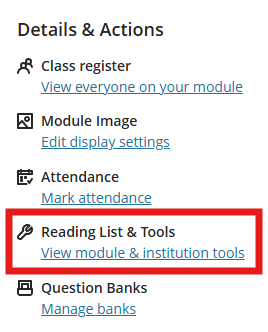
a. In your module, locate the Details & Actions menu on the right and click View module & institution tools.
b. In the menu click Turnitin Paper Lookup Tool.

c. If this is the first time you have used this tool, you may need to accept the Turnitin agreement.
d. Enter the CRN or module name in the search box.

e. Locate the relevant module and click to open.

f. Locate the relevant assignment and click to open.
g. A list of student submissions will appear, there may be more than one page.
g. Locate the relevant student submission, you can select the column titles to sort the results by Author, Paper title, Submission ID and Submission date.
h. Click the Download icon next to the submission.
You will have a number of options to choose from. There is no option to bulk download submissions.
- Download Similarity Report
- Download Original File
- Download Grading Report
- Download Grading and Similarity Report (this also downloads original file)
h. Click the download icon next to the relevant report and the file will download to your PC.

If you are unable to access the Turnitin lookup tool or locate the relevant submission please contact the Digital Learning Service.
You can access the Turnitin lookup tool from any module you are enrolled on as an instructor.
a. In the Module Management menu click Module Tools.
b. Click Turnitin Paper Lookup Tool.

c. Enter the CRN or module name in the search box.
d. Locate the relevant module and click to open.
e. Locate the relevant assignment and click to open.
f. A list of student submissions will appear, there may be more than one page.
g. Locate the relevant student submission, you can select the column titles to sort the results by Author, Paper title, Submission ID and Submission date.
h. Click the Download icon next to the submission.
You will have a number of options to choose from. There is no option to bulk download submissions.
- Download Similarity Report
- Download Original File
- Download Grading Report
- Download Grading and Similarity Report (this also downloads original file)
i. Click the download icon next to the relevant report and the file will download to your PC.
If you are unable to access the Turnitin lookup tool or locate the relevant submission please contact the Digital Learning Service.
You may also find the following guides useful:





