

Leeds Beckett University - City Campus,
Woodhouse Lane,
LS1 3HE
Download Inspera marks
Page last updated:
This staff guide shows you how to download Inspera marks and grades as a CSV file
Inspera is an assessment tool used for digital exams in Law and Nursing courses at Leeds Beckett University.
You can download the marks and grades as a CSV for each student on each question in a test, once the test is closed.
a. Log in to Inspera and navigate to the Grade module.

b. Locate the relevant test and click to open the test in the grading overview.
c. Click Options in the top right menu.

d. Select Marks and grades as CSV.
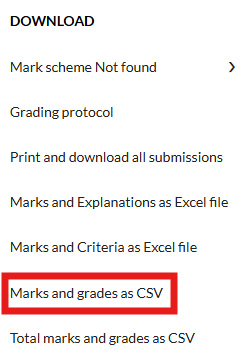
e. A CSV file will automatically generate and download to your device.





