

Leeds Beckett University - City Campus,
Woodhouse Lane,
LS1 3HE
Learning Object Repository | Ultra

Page last updated:
Staff guide to using content from the Learning Object Repository in MyBeckett Ultra.
The Learning Object Repository is a tool introduced for MyBeckett Ultra in early 2026.
The Learning Object Repository (LOR) contains documents that you can link to from a MyBeckett Ultra Module or Community, such as:
- A list of useful links for students at Leeds Beckett University.
- Guides to systems such as Turnitin.
- Skills support materials.
These Ultra documents are centrally managed by system administrators, meaning that content is reviewed and updated regularly. This reduces the risk of broken links that may be copied from year to year within Modules and Communities.
Feedback
This is a new tool and we would welcome your feedback. The list of items currently available is small but hopefully useful and we hope to add more to the Repository over time. If there are errors, or to discuss whether it is worthwhile us creating a new LOR item that all instructors would benefit from, contact Digital Learning using our details at the bottom of this page.
The LOR offers several benefits to instructors and module leaders, and is intended to be a useful repository of ready-made, and relevant content items for use in your Ultra modules (not available for Original modules). It has also reduced storage costs because the content only exists once in MyBeckett, but is visible in any module/community that it is added to.
All the content items in the Repository are also updated and maintained by Digital Learning, so if links, information or resources change we can update the item and those changes will automatically update the information in your module. This means the guides in the Repository will be kept up to date without you having to check and update content yourself.

a. In a MyBeckett Ultra Module or Community, click Create (The purple plus icon, wherever you want to add content).
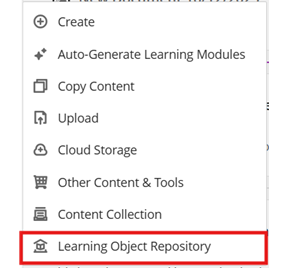
b. Click Learning Object Repository.
c. Search the Learning Object Repository for the content that you want to use.
d. Tick the checkbox to the left of the item. You can select multiple items if you wish.
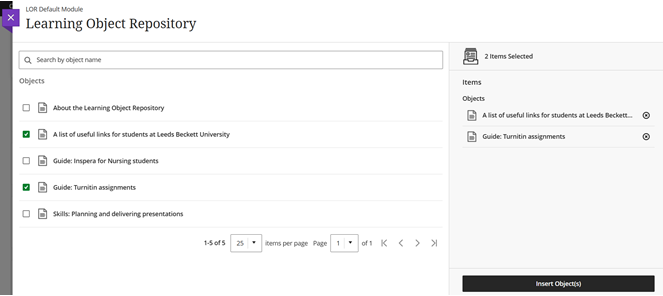
e. Click Insert Object(s).
f. The content item will appear in your Module/Community. You can click and drag to move it around the content page.
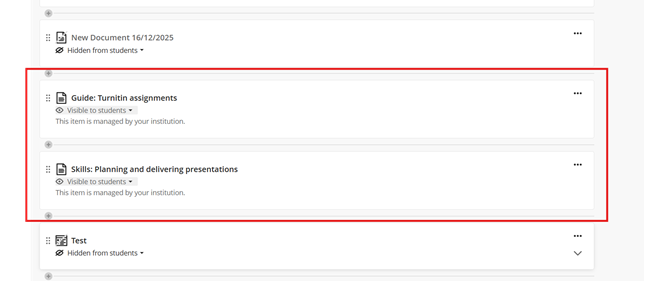
Please note, you will not be able to edit LOR content within your Module/Community as it is centrally managed by Library and Learning Services. LOR items contain the description 'This item is managed by your institution' compared to regular, editable items.
Known issue: Please upload LOR objects into a module directly instead of copying them from other modules. If you copy an LOR item from module to module, they become 'Hidden from Students' and visibility cannot be edited.





