Leeds Beckett University - City Campus,
Woodhouse Lane,
LS1 3HE
Performance Dashboard
Page last updated:
The Performance Dashboard is a report showing user activity within your module. It lists all users enrolled on the module, including staff.
a. In the Module Management menu, click Student Engagement and Evaluation.

b. Click the link for the Performance Dashboard.
c. The Performance Dashboard will open.
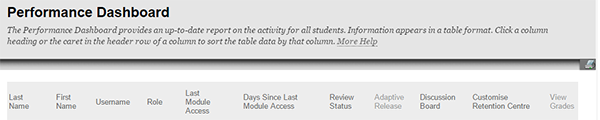
It includes data about:
- Role: for example Student or Instructor.
- Last Module Access: the date and time that the user last accessed the module.
- Days Since Last Module Access: the number of days since the user last visited the module, or the word Never if they have not accessed the module before.
- Review Status: the number of content items the user has reviewed.
- Adaptive Release: a view of the content items that the user can access within the module.
- Discussion Board: the number of forum posts the user has participated in.
- Retention Centre: the number of retention centre rules that the user currently meets.
- Grades: a link to the user's Grade Centre information.
- You can click links within a column to view more information about a specific user.
- You can sort the Performance Dashboard by clicking on any of the column headings. An arrow will appear in the column that you have used to sort the information.

- You can print the Performance Dashboard report by clicking the printer icon at the top right. Choose your printer settings, then click Print.