

Leeds Beckett University - City Campus,
Woodhouse Lane,
LS1 3HE
What is ATLAS?
Page last updated:
ATLAS is the part of PebblePad designed to support active teaching, learning and assessment.
Students, who can be organised into groups or sets on workspaces, typically submit their Assets for grading, feedback, monitoring or verification. ATLAS supports University processes and activities such as external review, marking and assessment archiving.
Example of the homepage/dashboard in ATLAS:
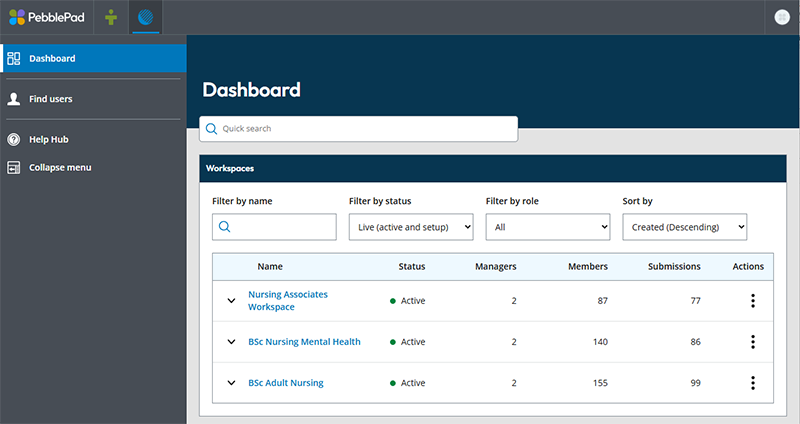
ATLAS is organised into areas called Workspaces, where staff and students can be enrolled. Assignments can be set up on a workspace to allow students to share their PebblePad Assets for marking and feedback. Students may also use workspace Resources such as PebblePad templates or bespoke course workbooks to complete their work, and share these back to the workspace for assessment.
The ATLAS dashboard is the first thing you will see when opening ATLAS. Any workspaces that you are enrolled on will appear on the main section of the screen to the right, where you may use the search boxes to filter by name, status or role. You will also see a left hand menu, which will display options for the page you are currently on. These options will change once you enter a workspace, where you'll see workspace management features and settings.
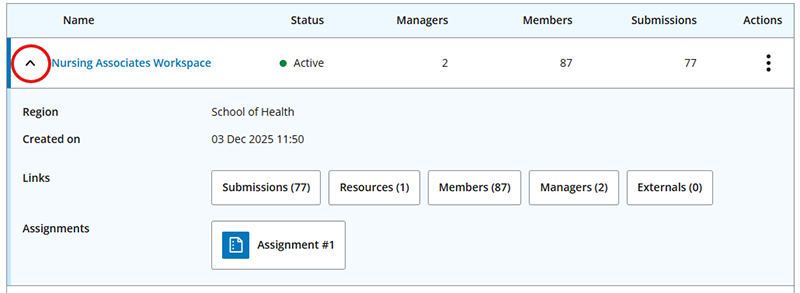
To enter a workspace, simply click on the workspace name. You may also click the small arrow to the left of a workspace name to see a quick glance at workspace areas and settings, such as viewing assignment submissions, resources, members (students) or managers (staff).
Example of expanding the workspace quick actions in ATLAS:
To gain access to a workspace, ask any member of staff enrolled on it to add you as a manager, or contact Digital Learning. Digital Learning can also set up a new workspace for you should you require one.





