Leeds Beckett University - City Campus,
Woodhouse Lane,
LS1 3HE
copy Inspera demo tests
Page last updated:
This staff guide explains how to copy folders containing Inspera demo tests information from one module to another.
You will need to start in the new module where you would like to add the content containing the demo tests information. You will also need to be an instructor on both modules.
Inspera is currently available for use in the Law School and School of Health (Nursing courses), to service PSRB mandated requirements for academic integrity in examinations.
Copy Content
You can copy the content via two ways.
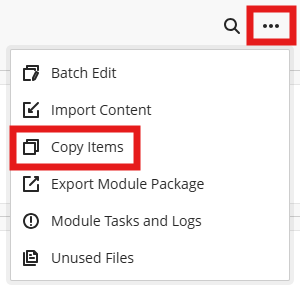
1. To place the copied content at the bottom of the main content page. Click the 3 dots and select Copy Items. The Copy Items page will open.
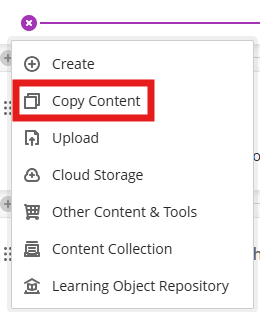
2. On the content page, navigate to where you would like to add the copied content. Hover until you see the purple line. Click the plus icon and select Copy Content. The Copy Items page will open.
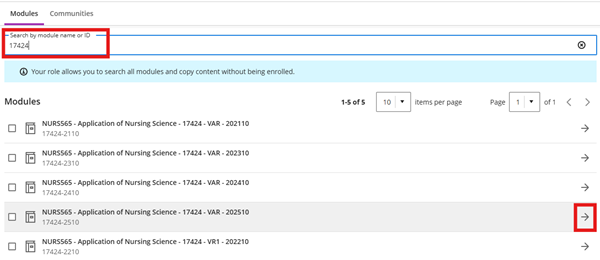
a. On the Copy Items page, use the search box to type the module name or CRN.
b. Locate the relevant module and use the arrows on the right to navigate inside the module.
c. When you have located the folder containing the demo tests information, tick the box to the left and the content will display in the side panel. You can choose several items to copy.
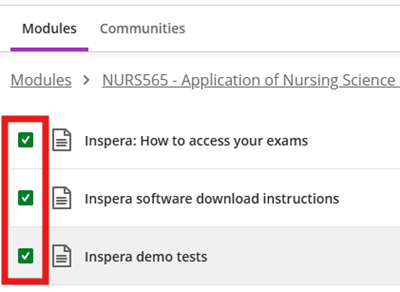
d. When you have finishing selecting and reviewing the content, click Start Copy. This may take a few minutes to process.
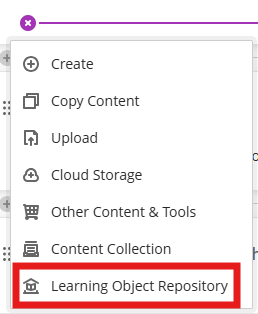
Add Inspera guidance for Nursing from the Learning Object Repository (LoR)
You can use the Learning Object Repository to add the Inspera demo tests guidance and student guides to your module. This ensures the content is up to date as it's managed centrally. Follow the instructions in our Learning Object Repository guide and select Guide: Inspera for nursing students.