

Leeds Beckett University - City Campus,
Woodhouse Lane,
LS1 3HE
CREATING A MS TEAMS LINK | ULTRA

Microsoft Teams in Ultra
This guide shows you how to add a Microsoft Teams link to your Ultra module.
The Microsoft Teams integration tool is no longer available from 15th September 2025.
Please follow these steps to create meeting link with your students:
a. We recommend that you set up an online meeting directly via MS Teams.
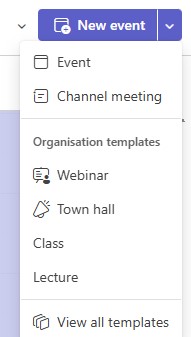
Note: There are several templates to choose from in Teams, to see the options and limitations select view all templates. Selecting 'Class' template may be the best choice.
, 
b. Once you have set up a Teams meeting from your Personal Microsoft 365 account, you can copy the joining link into your Ultra module in various ways:
- Create an Ultra document with the meeting information and joining link
- Create a link with the meeting information and joining link
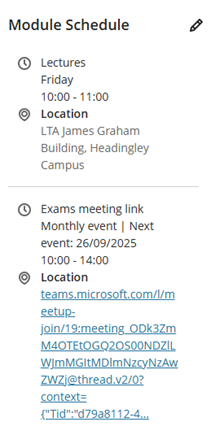
- Add the meeting link information to the Module Schedule (in the Details & Actions panel)
Alternative solution - Class Teams Sites
You may also wish to consider using a Class Teams site for each of your modules and will have your students added; you need to be invited to an existing Teams site or request a new one via the IT Self-Service Portal.





