
Leeds Beckett University - City Campus,
Woodhouse Lane,
LS1 3HE
Mark Inspera questions with Excel
Page last updated:
This staff guide shows you how to mark questions with Excel for Inspera tests.
Inspera is an assessment tool used for digital exams in Law and Nursing courses at Leeds Beckett University.
Marking questions with Excel allows you to mark assessments outside Inspera’s built-in grading tool by exporting responses, marking in Excel and then importing the marks back.
Please note the following regarding the XLS file content:
- The Total Score column will be ignored in the import - total score should always be the sum of marks on all individual questions
- The max score on a question in Inspera still applies, and cells with marks above the max score will be ignored in the import
- Empty cells in the XLS file will not overwrite existing marks in Inspera
- You can re-upload the XLS file at any time
You will first need to download an Excel file from Inspera to use for marking the questions.
1. Locate the Grade module within Inspera.

2. Access the Options dropdown menu.

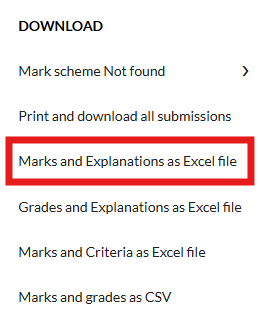
3. Under Download select Marks and Explanations as Excel file.
4. An XLS file will be saved to your computer. The file will contain the following columns:
- Candidate ID
- Question number
- Total Score (ignored when importing marks)
- If the candidates have not been given any marks yet, the Question column will be empty
5. Open the file in Excel and input the marks.
Importing marks from Excel is only available to Graders.
1. When marking is complete, locate the Grade module within Inspera.

2. Access the Options dropdown menu.
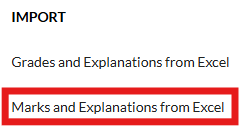
3. Under Import select Marks and Explanations from Excel.
4. Click Confirm.
5. Select the XLS file on your computer.
6. Click Open and the file will start processing.
Please note the following regarding the XLS file content:
- The Total Score column will be ignored in the import - total score should always be the sum of marks on all individual questions
- The max score on a question in Inspera still applies, and cells with marks above the max score will be ignored in the import
- Empty cells in the XLS file will not overwrite existing marks in Inspera
- You can re-upload the XLS file at any time





