Leeds Beckett University - City Campus,
Woodhouse Lane,
LS1 3HE
Grade Centre - ExcEptions and accommodations | Ultra

Page last updated:
This staff guide provides the steps for viewing and applying accommodations, exceptions and exemptions in Grade Centre
Accommodations are applied to a student to make a rule for all due date accommodations, meaning a specific students with a due date accommodation will never have their work marked late. For group assessments, this accommodation applies to all participant members of the group.;
How to apply accommodations for an individual student:
- Accommodations are usually applied via the Class Register section for course level accommodations.
- Apply to individual students via the Assignment Settings (for RAPS), accessed via the submissions area in the Grade Centre List View.
- Via the Grade Centre Grid View described below.
For a quick overview of the new layout, watch this video guide on the new Accommodations workflow [2 mins, created by Blackboard].
To view / edit accommodations:
a. Go to Grade Centre and toggle to the Grid view (four-squares icon):

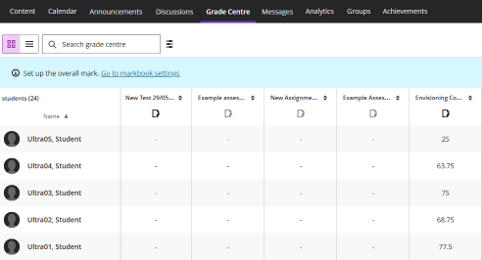
b. In the student list a purple icon will display next to any students with accommodations, exemptions or exceptions.
c. Selecting a cell in the Grade Centre column for the assessment and specific student will open the Mark Details (side panel). Check next to the student name to ensure the purple icon is visible here too.
d. In the Accommodations section there is a quick information banner showing the accommodations for the student at the course level.
e. For the specific assessment, you can toggle on Exempt Student, which will clearly display this in the Grid View for the assessment.
f. The other options available are Extensions for the Due Date / time limits and attempts allowed.