Leeds Beckett University - City Campus,
Woodhouse Lane,
LS1 3HE
Using the AI Workbook Generator
PebblePad Staff Guide
What is the PebblePad AI Workbook Generator?
The AI Workbook Generator is an AI-assisted feature within PebblePad, which can assist staff when developing a new workbook template for students to use. The tool allows staff to quickly generate structured workbook resources by providing prompts such as the subject area, intended audience, workbook description, and learning outcomes.
The AI then generates a draft workbook structure that includes suggested pages, templates, and content blocks, which can be refined by entering further prompts into the AI. A total of six refinements is allowed by the system before staff must decide to create the workbook or start again.
Once created, the workbook is saved into the PebblePad Resource Store, where it may be further edited or added to an ATLAS Workspace for students to begin using. The system relies on OpenAI models to process user prompts and generated outputs.
- As with all generative AI systems, outputs may contain inaccurate information, so it is strongly recommended that all AI-generated content is carefully reviewed by staff before use.
- Staff can make up to six prompt modifications to a workbook during the customisation step (a step within the setup wizard).
- Staff cannot manually add blocks in the customisation step, so edits must be made at this stage using an edit prompt into the AI.
- The generator only generates workbooks and does not support stand-alone template creation.
- Each workbook can contain up to 15 template pages, with each page including up to a maximum of 20 blocks of content.
- Uploads and attachments to AI prompts are not supported. Instead, staff may copy/paste detailed information into the prompt fields directly.
- Any further changes after creation must be made manually in the Resource Store, and the ability to revisit previous AI prompts is not yet available.
- The following workbook builder features are currently unsupported (but can be added manually after creation):
- Placeholder pages
- Nested workbooks
- Banner blocks
- Media blocks
- Selected block properties
- The system does not access or use any other personal or organisational data, only processing information provided in the prompts.
- Inputs and outputs are logged by PebblePad for 30 days, to measure the utilisation of the feature and to support future updates. User inputs and resulting model outputs are retained by OpenAI for up to 30 days for abuse monitoring purposes. User inputs are not used to train AI models and are only temporarily stored for the sole purpose of abuse monitoring.
- More on PebblePad’s AI Policy can be viewed here.
Staff are strongly advised to avoid entering any personal or sensitive data into prompts, and ensure that any AI-generated content is thoroughly reviewed and verified before use.
To access the AI Workbook Generator tool:
1. Log in to PebblePad.
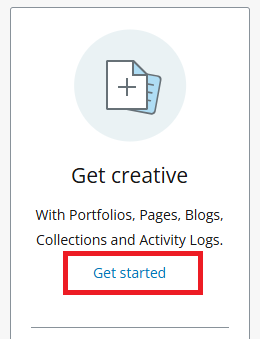
2. On your dashboard, click Get started underneath the Get creative heading:
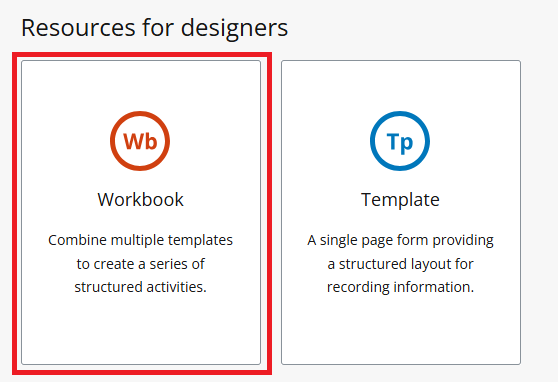
3. Under the heading for Resources for designers, click on Workbook:
4. Click Create with AI to launch the AI Workbook Generator tool, and follow the instructions to create your Workbook using AI: