Leeds Beckett University - City Campus,
Woodhouse Lane,
LS1 3HE
Managing assessments | ultra

Page last updated:
This staff guide is to help understand how to manage assessments and tests in MyBeckett, such as removing submissions, allowing another attempt, etc.
To clear a Blackboard test attempt:
1. Go to Grade Centre select the list view.

2. Navigate to the test and open by selecting the student name.
3. Locate the student and click the name to view their submission.
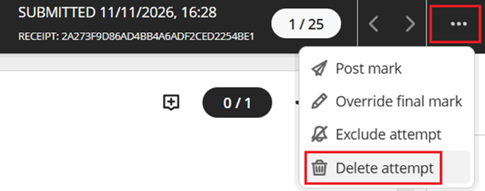
4. Click on the three dots more (top right), in the menu select Delete attempt and confirm.
- Turnitin Classic - Delete a students submission
- Turnitin Standard - Open the Turnitin inbox and locate the student submission and select the three dots more and select Request Deletion.