

Leeds Beckett University - City Campus,
Woodhouse Lane,
LS1 3HE
Online Enrolment
The online Welcome system is designed to allow you to complete essential tasks and to give important information you need before you arrive at the university. When it is time, you will be invited by email to complete your enrolment, you can also view your induction information and upload a photo for your student card within the system.


Deferring
If you have applied to defer your place to the next academic year and you want to accept your unconditional offer, please contact University Admissions:
- If you are a student originating from the UK, and applied through UCAS, please contact ucasadmissions@leedsbeckett.ac.uk.
- If you are a student originating from the UK and applied directly to the university, please contact directadmissions@leedsbeckett.ac.uk.
- If you are student arriving from outside the UK, please contact international@leedsbeckett.ac.uk.
Setting up your Welcome account
Continuing Students: you do not need to create an account. Click on the 'University account Login' button while on the enrolment pages.
New Students: you must create an account in order to access this service. This will include students who, for example, completed one course with us and are starting a second course.
- Click on 'Create an account'
- Enter your student ID. Your student ID will be on correspondence from the University
- Enter your email address the create account email was sent to
- Enter you date of birth


You should now create a password
You need to choose a password to use when you create an account in Online Welcome. Keep your password in a safe place and you should not share it with anyone else.
Your new password must contain:
- A minimum of 12 characters
- At least one digit, e.g. 1,2,3,4,5,6,7,8,9,0
- At least one lower case character, e.g. a,b,c,d,e,f,g,h,I,j,k,l,m,n,o,p,q,r,s,t,u,v,w,x,y,z
- At least one upper case character, e.g. A,B,C,D,E,F,G,H,I,J,K,L,M,N,O,P,Q,R,S,T,U,V,W,X,Y,Z
- At least one symbol, e.g. !,”,$,%,^,&,*,(,)
Click on the Create button.
This will create your account and take you to your Welcome Home page.
Logging in to Online Welcome
New Students
To login you should enter the following:
- Enter your email address used to create your account
- Enter the password you chose when you created your account
- Click on the Log in button
Continuing Students
If you are a continuing student and cannot log in, go to MyBeckett and check your password is working.
If you cannot log into MyBeckett, please follow the instructions for re-setting your password in MyBeckett.

Your Homepage
Your Welcome homepage shows you lots of information that you should read before you start your course. There are Useful links and Your Tasks which are important actions you need to complete as soon as possible.

Enrolment flow
The enrolment flow is made up of eight steps:
- Welcome
- Select course
- Personal details
- Further details
- Register to vote
- Career readiness
- Course fees
- Enrolment
Saving your information
Once all data for each section is correct please click on the orange 'Save' button.
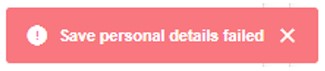
You will see a warning message like the one below if you have missed any questions:
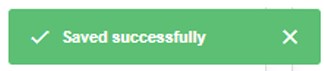
And the following if you have successfully completed all questions in that section:
You can then move onto the next section by clicking on the blue 'Next >' button
- You can navigate back to a section once saved by clicking on the top navigation bar.
- Once you have enrolled you will not be able to go back into the flow.
More details on the sections of the flow
Please check that all course and module details are correct.
Fee status is the status you have been judged to be, based upon the information in your application form. If you have any queries about this please contact feestatus@leedsbeckett.ac.uk.
Please check all your personal details are correct and update it if it is wrong.
It is important that your personal details and trusted contact details are kept up to date.
Further details data is required for HESA (Higher Education Statistics Agency) and to help the university to offer you support during your studies.
If you would like to register to you can do that here.
British, Commonwealth or Republic of Ireland citizens are entitled to register to vote in all elections in Britain. Citizens of European Union states are only entitled to register to vote in local and European elections. If you are eligible and wish to register to vote while you are resident in Leeds, please complete this section.
This section asks questions relating to your career planning.
Here you will be able to choose from a number of options about how your course fees are being funded.
Where possible you will be presented with your course fees including any scholarships and discounts you may be entitled to. If any of your information changes this fee may be reassessed. Where an individual fee is not possible you will see your standard course fees.
If you think you are eligible for a discount which is not showing, please contact fees@leedsbeckett.ac.uk quoting your Student ID number.
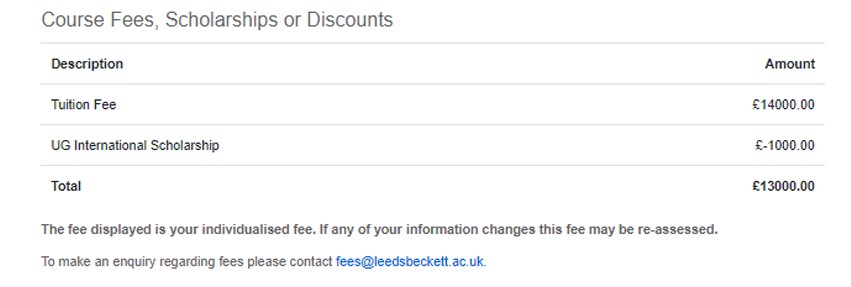
If we are unable to determine your fee you will not be able to progress through to enrol.
Sponsor Information
If you have indicated on the previous page that your fees are being paid in full by a third party sponsor you will be requested information about your sponsor. Please enter as many details as possible so we can invoice the sponsor.
Payments - Contributions
If you have indicated on the previous page that your fees are being paid by yourself or a family member you will be able to stipulate the value of your contribution. Please note you will be invoiced for any outstanding amount at a later date.
Part Payment of Course Fees
If you have indicated on the previous page that your fees are being paid by a combination of methods, you will be required to allocate amounts to each contributor. You may then be taken to the Sponsor Information page if you have allocated any amount to a sponsor.
Please note that irrespective of any undertaking by a third party to pay fees, ultimate responsibility for payment of fees shall always remain with the student.
Please see the expanded section below.
Section 8: Enrolment
'Enrolment' has five sub-sections:
The first screen has your course details and the modules you will doing. If your modules are incorrect, please contact your course Administrator before completing your enrolment.
Where possible you will be presented with your course fees including any scholarships and discounts you may be entitled to. If any of your information changes this fee may be reassessed. Where an individual fee is not possible you will see your standard course fees.
If you think you are eligible for a discount which is not showing, please contact fees@leedsbeckett.ac.uk quoting your Student ID number.
This is a summary of the Leeds Beckett University Student contract.
You must click on the View Additional Information link to view information relating to any criminal convictions. Once you have read the information please tick the box, along with second tick box (agreement to be bound by General Regulations and other Relevant Documents).
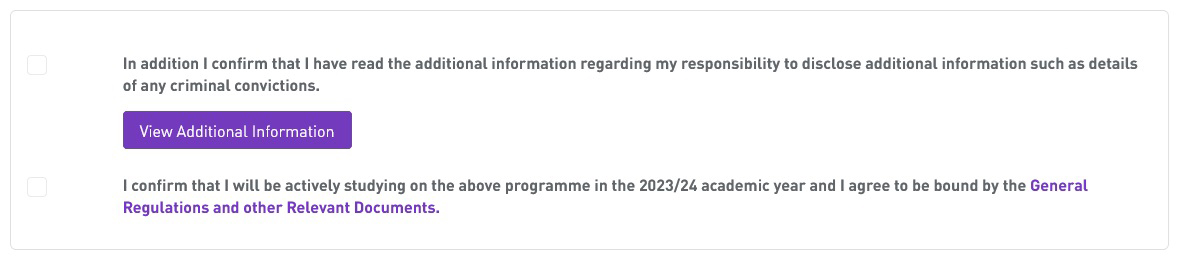
When you are happy that all information is correct please click Enrol.

You will see the following message if your enrolment has been successful.
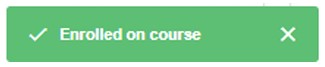
You will be sent an email to your personal email address confirming your enrolment along with a copy of your student contract.
Please contact welcome@leedsbeckett.ac.uk if you have any issues with completing your enrolment.
When enrolment is complete you will see a tick in 'Your Tasks'.

Other links on the home page
This page will give you all the details of the induction events that have been set up for your course in the first week at Our University. If there is no induction information available yet, don’t worry, your Student Administrators will be putting the information online soon and you should check back regularly or contact your Student Administrator.
These login details will give you access to university services such as MyBeckett (your online learning environment including modules, announcements and your university email).
University login details are available to be created after the first day of each term has past. The term start dates are 1 August, 1 January and 1 April.
Once you have created your Welcome account and the term date has past, it will take up to 48 hours for your University login details to be generated and displayed in a link on your Welcome homepage labelled Your University Log in Details.
We have created a guide to help you log into your university account.
Update My Contact Details is a system that allows you to update or input details for the following:
- Personal Information
- Trusted Contact
- Home address
- Term time address
Here you will be able to upload a picture for your Campus Card. Your Campus Card will allow you to access a wide range of University facilities such as The Library, The Sports Centre, printing and photocopying services, as well as access to various buildings. Please follow the instructions on the website, making sure your photo is no more than 10MB and is a passport style photograph.
If we already have your photograph on our system you will not be able to upload another one. If you are unable to upload a photograph, get one taken at your campus card collection point when you arrive at the university to be uploaded onto your card.
This link will take you to a page where you can download the Leeds Beckett app, which provides access to your online learning tools along with information and functionality to support all areas of student life, from health and wellbeing to social events, from transport to food.
You will need to log in to My Beckett via a browser at least once before you can log in to the app.
All students who require immigration permission to be in the UK need to evidence this to the University on their arrival. The Student Immigration Advice and Compliance (SIAC) team run ‘International Check-In’ to welcome overseas students to the University and to complete the mandatory immigration document (passport and visa) checks required by the UK Government.
This link will show you the Enrolment Confirmation documents that were created when you enrolled onto your course.





