Leeds Beckett University - City Campus,
Woodhouse Lane,
LS1 3HE
THE GRADE CENTRE | ULTRA

Page last updated:
The new Grade Centre
This is a new staff guide for Grade Centre, it is a simplified interface released on 13 August 2026 with improved navigation and a new Grade Details panel that brings marking information and actions into one place. You can watch the supporting videos from here or click links throughout this guide: Blackboard Grade Centre Videos.
Key improvements include:
- A streamlined mark entry workflow - watch this video on Manual Grading and Posting marking [01:38, created by Blackboard]
- Exceptions and exemptions are now grouped under Accommodations
- Clearer mark posting processes
New Navigation
Watch the introduction of the navigation and layout [01:45 mins, created by Blackboard]
The top navigation bar provides quick access to:
- Grid view (four-square icon) - Filter and search, list view of all students including accommodations, columns with assessments and marking data
- List view (three-line icon) - view and mark all assessments and view submission data. (This is an accessible dashboard which clearly shows Turnitin assignments)
- Search - find students or assessments quickly
- Filter - refine the information displayed and merged modules if applicable (only in grid view)
- To Do - opens a side panel showing Needs Marking / Needs Posting items (ignore for Turnitin)
- Grade Centre settings - via the cog icon
Grid View
Watch the introduction to the Grid view [3:35 mins, created by Blackboard)
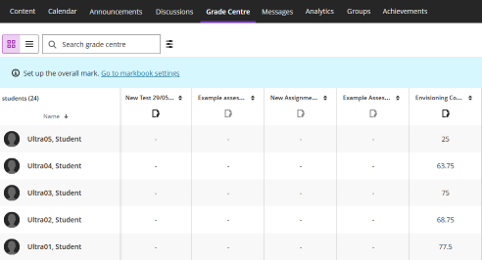
Displays assessment columns across the top and students down the left, includes:
- Marks and assessment data
- Search Bar
- Filter option
- Accommodations for all Exceptions and exemptions grouped together
Watch this video on understanding the Column Headers and the new assessments panel [03:20 mins, created by Blackboard]
List view - mark all submissions from here
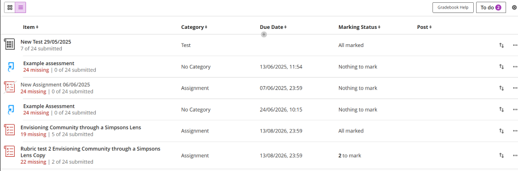
Displays all assessment links alongside key submission information, including:
- Submitted and missing submissions (not reliable for Turnitin- see known issues)
- Due dates
- Marking Status
- To view and mark the assignment submissions click each link
View the Marking guide for more details.
Grade Centre Settings
The full overview are within the Grade Centre Settings (cog icon, top right), where you can:
- Choose how the student names are listed in Grid View - order by Surname or First name
- Upload and download Grade Centre marks
- Manage Marking Schemas (Percentage, Points, Text or other)
- Student Performance data
- View Module Activity report
- Apply Automatic Zeros for overdue assessments (optional)
- Set up Overall Marks / Calculated Columns (optional)
- Manage Grade Centre Items - Bulk edit either categories and assessment visibility
- Add a Category - create your own
- Blackboard Rubrics - Create your own or generate